What is Google Public DNS?
Google Public DNS is a free, global Domain Name System (DNS)
resolution service, that you can use as an alternative to your current DNS provider.
To try it out:
New! For IPv6 addresses, see our configuration instructions.
If you decide to try Google Public DNS, your client programs will perform all DNS lookups using Google Public DNS.
|
|
Why does DNS matter? The DNS protocol is an important part of the web's infrastructure,
serving as the Internet's phone book: every time you visit a website,
your computer performs a DNS lookup. Complex pages often require
multiple DNS lookups before they start loading, so your computer may be
performing hundreds of lookups a day. The DNS protocol is an important part of the web's infrastructure,
serving as the Internet's phone book: every time you visit a website,
your computer performs a DNS lookup. Complex pages often require
multiple DNS lookups before they start loading, so your computer may be
performing hundreds of lookups a day.
|
|
Why should you try Google Public DNS? By using Google Public DNS you can: By using Google Public DNS you can:
Google's motivation, according to the company, is to both speed up Web browsing as well as provide enhanced security. "We believe that a faster DNS infrastructure could significantly improve the browsing experience for all web users," Prem Ramaswami, of Google's Public DNS Team, wrote in a blog post. "To enhance DNS speed but to also improve security and validity of results, Google Public DNS is trying a few different approaches that we are sharing with the broader web community." |
Wednesday, April 25, 2012
Public DNS

Monday, March 19, 2012
How to Re-sync or Re-timing subtitle
You download a movie from torrent,
direct download or whatever P2P software but at the end you found out that
there is no suitable subtitle for that movie. The entire subtitle you found
from the net doesn’t has perfect synchronization with the movie as you hope
for. In the other word, the timing between audio (actor/actress voice) and
subtitle doesn’t matching.
And now you start to wonder (I was)
if you could re-synchronize the ‘not so match’ subtitle to with this
video/movie (voice)?
The answer: Yes you can and it
doesn’t require even a single cent.
Requirement:
- Download Subtitle Workshop from www.urusoft.net: Download page here.
- Subtitle Workshop is a freeware.
- Your movie and it’s ‘not so match’ subtitle (example extension .srt)
Step:1
Install Subtitle Workshop (current
version as I type this mini tutorial is 2.51).
Launch your Subtitle Workshop 2.51
Load your movie into Subtitle
Workshop by : Click on Movie à Open
(from the its menubar)
Load your “not so match” subtitle
into Subtitle Workshop by : File à Load
Subtitle (from its menubar)
Note
: Alternatively, you can drag and drop your movie and ‘not so match’ subtitle
into Subtitle Workshop.
You should have this kind of screen
(more of less, if you use Dragon war movie and nedivx dwar.srt subtitle).

Now, what you need to do is to know when is the exact time for the first voice will be heard.
So, play the movie (using Subtitle workshop) by pressing play button and listen carefully. Be ready to hit pause button when you start to hear voice related to subtitle wording below. If you miss the exact time, you can either estimate how much fraction of second you need to deduct or simply redo.
As for my case, I notice that the first voice saying “Everyone believes the time….” start at 8.803 sec.


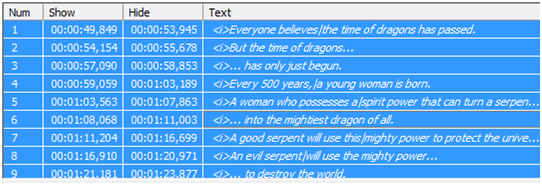
Note that, in my ‘not so correct’ subtitle, the first phrase is at 49.849 seconds which is almost 41 seconds later than what it should be. Indirectly, you should catch up by now, what you should do is, make all phrases (timing) in this subtitle start (49.849-8.803 = 41.046) 41.046 seconds sooner.
In order to do that,
- Make sure your sliding indicator at the correct time
-
Click on any subtitle phrase and press CTRL+A (or click Edit à Select All)


Result : All phrase in my subtitle now, move 41 second earlier which is the correct timing for this movie.
Comparison

Verify
To verify that your new subtitle perfectly match with your movie audio (subtitle) simply click on Play button. Subtitle Workshop will play the movie and display your newly edited subtitle. If you satisfy with the result, save it by : File à Save (or Save As).
Enjoy

Thursday, February 23, 2012
How to install IC-PROG XP Driver?
IC-Prog
This software package allows you to program all types of serial programmable Integrated Circuits using Windows 95/98/NT/2000/ME/XP/VISTA
If your PIC microcontroller is hooked to the parallel port of your PC with the ISP programming cabel, then you can use the program IC-PROG to load your source code into your microcontroller. If you have made your program code in assembler or in MICROC the compiler generates a hexfile. This .hex file you have to load in the microcontroller to let it work. You can download ICPROG from this website:www.ic-prog.com .
You have to set the program to Funcard programmer. Click on F3 and you wil get the menu to set the hardware you use. Here you can also set the parallel port you use.


The next step is to get the .hex file you want to load in your microcontroller. Click on File > Open set the file type to .hex and select your .hex file and click Open.


Subscribe to:
Posts (Atom)